The Calligra team is very proud to announce the first release ever of the Calligra Project, version 2.4.0. This is the end of a very long journey that started over a year ago and has now lead up to the first stable release of Calligra.
Introduction to Calligra
Calligra is an integrated suite of applications that cover office, creative and management needs. It’s the most comprehensive free suite of applications anywhere and we expect the number of applications to grow as the project matures. Calligra offers its applications on both desktop computers and mobile platforms like tablets and smartphones.
The desktop version of Calligra is called the Calligra Suite. Version 2.4 of the Calligra Suite contains the following applications:
Office applications
- Calligra Words Word processor
- Calligra Sheets Spreadsheet
- Calligra Stage Presentation
- Calligra Flow Diagrams and Flowcharts
- Kexi Visual Database Creator
- Braindump Note Taking
Graphic applications
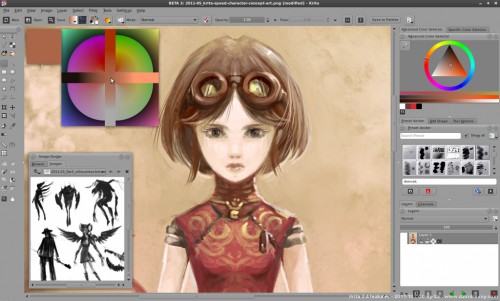
- Krita Drawing Application
- Karbon Vector Graphics
Management applications
- Calligra Plan Project Management
There are also versions for mobile platforms and these have their own user interfaces suited for touch computing. This release contains two such user interfaces:
- Calligra Mobile A version of Calligra for the Nokia N900 smartphone . This version is both a viewer and a document editor. It supports text documents, spreadsheets and presentations.
- Calligra Active A more modern user interface for Calligra that is well integrated into the Plasma Active tablet environment. At this time Calligra Active is a viewer only.
Several companies have used Calligra as a base for their own office solution. Nokia uses the Calligra Office engine in the Documents application on Harmattan Meego. Every N9 user already has Calligra installed on their phone!
Calligra uses the Open Document Format (ODF) as its main file format which makes it compatible with most other office applications including OpenOffice.org, LibreOffice and Microsoft Office. It can also import the native file formats of Microsoft Office with great accuracy, in many cases the best you can find.
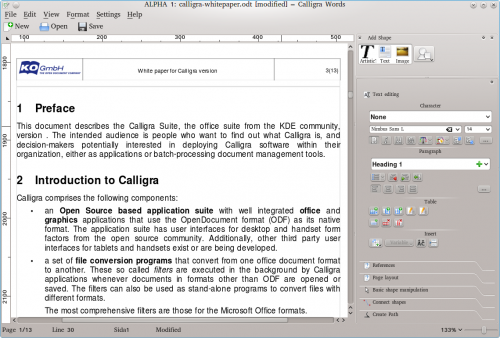
The applications in the Calligra Suite shares some common UI concepts that gives it a modern look better suited for the wide screens of today. One of them is that most formatting is done using dockers which are placed at the side of the windows instead of on the top. This makes more space available for the actual document contents and avoids opening dialogs on top of it. If the user chooses, s/he can rearrange the placement of the dockers around the document area or even tear loose them and let them float freely. The arrangement is saved and reused the next time Calligra is opened.
News in This Release
This is the first release of Calligra so maybe talking about news is not the thing to do. However, Calligra is a continuation of the old KOffice project and it may be interesting for KOffice users to know what they will get. Here are some highlights:
- Calligra now has a completely rewritten text layout engine that can handle most of the advanced layout features of ODF. This includes tables that can now span more than one page, footnotes and endnotes and correct run-around around other objects such as pictures. This text layout engine is used all over the suite. The Words application itself is also largely rewritten but this is not as visible to the user.
- The user interface is simplified. In Calligra Words multiple docks are now combined into one area controlling most aspects of text formatting. Kexi introduced modern modeless views.
- Calligra can now handle larger parts of the ODF specification. One example of this is handling line endings like arrows.
- There are several new applications including Flow, the diagram application. Braindump, the note taking applications is another new member of the Calligra family.
- Calligra Active is a new interface for touch based devices and especially for the Plasma Active environment.
- Import filters for Microsoft document formats have been enhanced to a new level.
- On the technical side handling of styles, especially style inheritance works now. Roundtripping of advanced documents has also been improved a lot.
- And of course many many bugs have been fixed as well as enhancements to almost all small or big parts of Calligra (see also the Kexi changelog).
Try It Out
The source code of this version is available for download here: calligra-2.4.0.tar.bz2. Also many binary packages are available for various operating systems and distributions. This release is packaged for Windows by KO GmbH, and you can find it on their download page.
We would welcome volunteers who want to build the Calligra Suite on OSX.
About the Calligra Project
Calligra is a KDE community project. Learn more at http://www.calligra.org/ and http://www.kde.org/ .


This is great news and a big hat-tip for all your hard work in delivering version 2.4.
I was very interested to read that Calligra was used as a base for the Meego 1.2 Harmattan documents viewer by Nokia.
There is naturally a big demand amongst N9 owners for a version that allows both viewing and editing of documents. So I was wondering if and how the initial application could be developed further to offer the full editing functionality?
Is this somethng that Calligra could ellaborate on? I note that you have released the open source for the code. Are you aware of any developments (or hint of similar efforts) to bring this to the Nokia N9?
Regards
John
Hi John. Nokia themselves have developed the UI on top of the Calligra Engine and I am not aware of any plans to make it an editor. However, the source code to the UI is also open so anybody can download it and continue on an editor. It’s a bit tricky to find and I don’t have the URL in my head so I have to wait until somebody else fills me in though.
The source code can be found at http://harmattan-dev.nokia.com/pool/harmattan/free/o/office-tools/
Congratulations to you all!
Congratulations!
And thanks for all the work you all put into Calligra!
I’m looking forward to trying it out!
Thanks, Calligra is awesome!
Besides some really complex documents (full of formula, diagramms and other stuff for university documents) seems really compatible. And I like the redesigned user interface, especially the useful sidebar.
Hopefully other users are also as impressed as I.
I have been waiting for this since I first heard about it… and it’s finally here! Simply awesome.
What kind of release schedule is Calligra going to follow in the future btw?
We plan to release every 4 months from now on. Though it’s not a strict 4 months.
And thanks.
This is great news. Congratulations to the release!
It’s party time!! \o/
Congratulations!
What happened with kchart? It’s removed from Calligra?
Thanks..
Well it lives on as a shape that can be inserted into other apps, but as a standalone application with it’s own canvas etc then no it’s not there anymore. It actually disappeared back when KOffice 2 came out
And are any plans to recover it at the future?
There’s no need to (duplicate). It’s always easier to start with empty spreadsheet or text document and insert the chart. You always need data for it anyway. Moreover chart’s format is not a separate one in ODF, so the result would not be exchangeable with other apps.
That is actually wrong, Jaroslaw. There *is* a separate chart document type with the designated extension .odc (open document chart). But you are right that it’s not a high priority even if we probably should do it at some point for the sake of completeness. Likewise there is a document type for mathematical formulas called .odf(!).
Congratulations! I’m looking forward to test it out on my computer.
Very nice, thank you guys!
Congratulations for such a very good software!!!.
Congratulations! It has been a long road and I am happy that you made it. I am downloading the release right now. I look forward to using it and to all future versions.
Wow men, what a wonderful work ! Many thanks for this suite !
Congratulations to everyone on the first stable release of Calligra 2.4! I’ve been eagerly anticipating this for a long time, and can’t wait for Pat Volkerding to package it for Slackware!
Btw, I’ve just noticed on the Get Calligra page that the “KDE HTTP or FTP mirrors” link is currently pointing at KOffice 2.3.3. I’m guessing that it’s not supposed to point there anymore though…
Once more, thanks to everyone involved in the creation of Calligra Suite!
Congratulations. I’m trying to move away from the bloated LO/OOo for quite some time and the only thing that was preventing me to switch to KOffice when I was trying it about a year ago was bad support for tables in KWord. Now if this works right in Calligra Words you have a new user. BTW I loved how much ligter KOffice was compared to OOo and I love the user interface of Calligra. Tools on side are genious. Keep up the great work!
They used the wrong link.
Try this http://download.kde.org/stable/calligra-2.4.0/calligra-2.4.0.tar.bz2
Link fixed now.
Awesome to see a final “gold” release! The beta’s were fun. Krita has slowly become a favorite app of mine, and Words is getting there very quickly!
Congrats to the Calligra team, looking forward to trying this on my N9 and opensuse 12.2 in June.
Calligra still has no way to export to MS Office formats, which is a show stopper. OpenOffice.org and LibreOffice have that ability. Why has Calligra been unable to implement it?
Just save as odt and convert with libre office. Not perfect, but no show stopper.
It so stupid to have LibreOffice to convert odt to MS format. Why do I need to offices on the computer? Or KWord support MS format or not and looks like it doesn’t and time to switch to Calligra is not yet here. I sorry because Krita is not independent application but…
It’s true that if your workflow involves saving MS Office files then Calligra is not yet there. But many people only use ODF and sometimes import MS Office documents. For them Calligra should be good enough already. It’s also true that not all formatting features are editable in the UI yet, but we are going to work on that next and we expect things to improve quickly. See also my new blog: http://ingwa2.blogspot.se/2012/04/calligra-24-released-now-what.html
Regarding Krita, it’s not published stand-alone but it’s often packaged as a stand-alone application. Maybe your Linux distro lets you install Krita only (and some libraries). If you’re running Windows you are currently out of luck but we are looking at providing Krita as a separate download but don’t hold your breath at this point.
It’s quite a big task and we have limited manpower. Most work went into improving the infrastructure, fixing bugs and improving the import filters.
Awesome! Any plans for bibliography plugin functionality for Words? – like Bibus or Zotero?
Yes with a bit of luck in 2.6
Where is the N900 download package?
And where are the sources located? I can only see the Koffice project in Gitorious.
Please look at http://community.kde.org/Calligra/Building#Getting_the_source_code
Where do you guys keep the unstable N900 builds? They’re not in the kde repository and that’s quite understandable. Please let us know as the maemo community is eager to test out Calligra Mobile.
So, where is the 3.4 builds for windows? Is there any data when they will be release?
The experimental ones didn’t work for me (something related to ICONV.DLL).
I have been awaiting this release since the original announcement of the Calligra project. I am very fond of Libre Office and all the work they have done since their fork from the OpenOffice project, but I have always wished for something better integrated with KDE. The KOffice suite had a number of issues, the most prominent being the lack of good import filters for Microsoft applications, and the absence of any way to export documents to Microsoft users. While Microsoft’s implementation of ODF is not perfect, the advent of that standard does offer a workable alternative. Now I only have to wait for the Debian folks to package Calligra up for use with their distibution. Hopefully, that won’t be long.
Kudos to everyone that pushed this project forward. Your perseverance is to be congratulated and admired. I look forward to reviewing your product.
That’s great, thanks for all the hard work!!
toolbars on the side is smart, taking advantage of widescreen; if only google maps could learn that
but for us windows people, why should I bother ?
I mean seriously – why is it worth the effort ?
I know windows, I can do a lot of complex stuff, and I know I’ll be frequently unhappy because of some WTF stupidity (like in office 2007, if you paste a pic into a document, you can’t group it with a text box; like no x error bars in excel scattergrams, or , the king of fubars, in excel, if you select two columns of numbers, and then use the scattergram wizard, you get a chart that looks like a scattergram
however, if some of your numbers are not what excel thinks are numbers, you don’t get a scattergram – you get a catagory label on the x axis, and, here is the real wtf, there are no error message; even if you select the cells and force format =number 2decimal place no commas , excel still won’t treat them as numbers, andit won’t tell you that it changed the chart type !!!!!
The UI chrome takes half the screen, mostly with empty gray space. Can you even see the document you’re working on in this thing? Worse than MS’s awful ribbon… Who would choose to use this?
Set the document zoom to ‘fit page width’ and you will see the maximum amount with no gray space around it.
Muchas felicidades Calligra team por su gran trabajo.
Espero que pronto openSUSE Tumbleweed lo tenga en sus repos para instalarlo en mi laptop.
Congrats team. It looks great.
I suggest changing the name of Krita to something like Calligra Canvas, Calligra Painter, or Calligra Pictures.
Really great, the first Release of Calligra!
awesome! I intend to apt-get install it the day it is available for Debian (even when in experimental or what) and try it out. I already use Krita from time to time, I tried feeding KWord OpenOffice/LibreOffice documents but some formatting where different. I will try again and intend to report when I still find bigger differences.
I assume you mean Words rather than KWord, right? But in any case we are very interested in bug reports about formatting.
Great work, but again:
Would you please tell us where the N900 download package is?
@Jaros?aw Staniek: It is NOT at http://community.kde.org/Calligra/Building#Getting_the_source_code
Actually it is. It tells you how to download and compile the sourcecode. In the source there is Calligra Mobile which is what works on the n900. We don’t build and package binary packages so if that is what you are looking for you are out of luck. It similar to how linux distributions package for each of their own distributions and Ko GmbH does for the windows package. As far as I know there is no one packaging for N900, so you will have to build it yourself.
Looks fantastic, and congratulations!!!
The interface is very forward thinking, and much appreciated here on my widescreen laptop. More than the layout even, I appreciate how it “thinks” the same way I do.
The features and abilities of most apps are an excellent foundation for version 2.5!
Krita — wow.
Can someone point me to instructions how to install it in Debian.
Or does someone know when it will be available for Debian? In the repos or as a package?
Thanks!
Hi,
You can follow our work on the Debian packaging here :
http://anonscm.debian.org/gitweb/?p=pkg-kde/kde-std/calligra.git;a=summary
It’s planned to have calligra included in unstable soon…
Calligra 2.4 stable version for windows is still not available though -> http://www.kogmbh.com/download.html
any news on when will it come out for us windows users?
and congratulations on the first stable release!!!
First of all it takes users to try out the experimental versions. Giving us feedback on bugs. We can then fix those bugs, and when we feel that the windows version is solid it will be relabeled as something less than highly experimental. The trouble is that even though it’s now built for windows we have close to no testing. Only known deficiency right now is that import of .doc files is broken and has been disabled. but there could be many more bugs lurking. So you users can yourself help make it more stable by testing it. Just don’t use it for something important while testing.
Also just checked. Though the page says RC2. the package you download is indeed 2.4.0. So the final version is there. It’s just important to remember that it’s clasified as highly experimental as i explained above
Awesome?
binaries available for Ubuntu ( a gnome specific distro ) while Debian (many KDE only users) does not.
KDE user in Debian .. Sad
We are working on it… We expect to have calligra included in Debian unstable before the freeze.
Calligra is getting better release after release, much more complete in features and especially much more stable than beta versions. Wonderful job, guys & gals,
, but I’m going to be a bit critic, I hope in a constructive way.
Word is still unusable in the real professional world: can’t open a webpage and even worse, can’t even keep the format and the images if you copy a web page’s content; but try to paste the same content you have tried to paste in Words, in Google docs, and everything will be correctly pasted, maybe with some minor format issues and/or font replacement. Let’s hope this will improve soon.
Also, why all that empty space in the panel? Why is it so wide, it takes almost 10 cm of my screen for showing like 40 – 60% of empty grey chrome depending on which tool I’m using. Are you sure is a good idea to move all the controls to the panel? Wouldn’t it be more logical to keep some, like paragraph tool, font format and size, etc, in the toolbars and make the panel more narrow? That exageratedly wide panel is really annoying: with Libreoffice Writer, for example, you can work with two windows showing a complete A4 page on screen on a 17″ 1440 px wide screen simultaneously; this is imposible in Calligra if you want to still be able to read the text, the only way is hiding the panel, which is necessary for editing paragraph format, for instance, because you have decided that having such tools in some toolbar under the menus is a bad idea.
But I’d like to insist on a better “economy” of the interface space, for example, the tool “Paragraph” occupies almost 10 cm on a 15″ 1280 px wide screen, as said before, but the widest text in the rollover menu is more or less a third of all this width. Why?. Under “Character” and the font family and size scroll menues there are 9 buttons that occupy most of those 10 cm; couldn’t them be arranged in 2 rows, like the paragraph or the table tools, making the panel more narrow?
I’m aware that KDE, or QT, I don’t know who’s the culprit, has never been very smart about this, there are lots of wasted spaces in almost any KDE/QT app interface, but isn’t time to stop this disparate?
A last issue, not very important, to be honest, but a little annoying. Caligra doesn’t respect the user’s color scheme in some zones of the interface making some texts unreadable if the user works in a dark background color scheme. Try to set your background in black and your text in white, or choose for a while the “Obsidian coast” KDE theme, you will see how Calligra draws the text in black in boxes like Character and Paragraph, no matter if the user has set white text in their KDE color scheme. As you can imagine black on black, or, if you test the “Obsidian coast” theme, black on dark grey isn’t a very good combination.
Other than the aforesaid issues I must say that for a domestic/minor use Word can replace LO Writer almost completely, always that you don’t need to copy content, especially images, from the web.
Cheers and thanks for your work.
Pardon, I wanted to say «the widest text in the rollover menu is more or less a third of all ITS width.», meaning that there’s no sense for such wide rollover boxes, if some text is too wide, that text should be cut, since the majority of paragraph styles names, or family font names, etc, are aproximately 35-40%, at most, wide.
Works really good. Found one bug thou, it crashes when trying to configure spell checking. Also I can’t find any way to remove paragraphs in Style Manager, just to add them.
One thing I would like to see also, is the ability to add borders to styles I create. Can’t find any way to do this. I have old MS Word documents I opened, and the border styles are there, but they can’t be edited.
– Mike
Hi
Sorry that the program can´t save in Word format. This issue exklude the program to be used professional. MicroSoft Office is used in the most companies Worlvide. So if you make it possible to save in Word format, I maybe could be interested.
Wow. What a great suite! I was wondering, though, if a mindmap application could be added to the office suite at some point. A well-integrated mindmap application would be really useful, both as a creative “preprocessor” to the other applications as well as a useful tool in its own right.
Thank you! I am pretty sure that a mindmap application eventually will be written. Or perhaps better: One of the already existing mindmap applications will be made compatible with Calligra. When that will happen is anybody’s guess though. As far as I know there are no concrete plans from any of the current developers to do it in the near future.
Maybe you can take a look at braindump (the note taking app) and see if you can work with that in the mean time.
Hi,
I just tried the Windows version and it looks great, good work!!!
Just want to know: when do you expect the PLAN part to work?
- Brian
error from software installer:
trying to overwrite ‘/usr/share/doc/kde/HTML/de/thesaurus/index.docbook’, which is also in package koffice-l10n-de 2.3.2-0ubuntu1
Gran proyecto, grandes persona, viva el software libre. Os X lion 10.7.4 very nice.
Is the Calligra Active team planning to develop a flavor for the N9/950 too, not just the Plasma tablet?
Or are they at least making it as easy as possible to port and repackage it?
Why they so far behind the Calligra Mobile team with regards to editing functions etc.
Thank-you.
Estoy probando Kubuntu 12.10 Alpha 3 que trae por defecto instalada esta suite de oficina Calligra pero no me gusto para nada, no permite guardar en formato .doc solo .odt y no es muy confiable con los PPt, PPS y las hojas de cálculo; al ver archivos hechos en MSOffice no guarda la estructura, prefiero LibreOffice que aun con algunas fallitas es mucho mejor que Calligra, de hecho ya la desinstale y puse la suite de Libreoffice 3.6 Beta que anda muy bien.
Re the comments about the “wide space to the right”.
I wrote an article at Linux Forums quite a while ago about how the whole layout is very “ergonomic”.
One “sweeps” the mouse to the side for the most common activities as opposed to having to drag the mouse up to the top in LO or MS, or other suites. ( I’m sure that a CLI fan will post that the most ergonomic way is to use CLI but, I’ll let that pass!
)
Being able to sweep the mouse to the side reduces wrist strain etc. which, since I spend a LOT of time with my nose buried in a word processor, is of GREAT benefit.
I agree that it would be nice to have export for .doc but as I argued in the above mentioned article. If one does not “have” to interact with the MS format then there is no NEED for an export function.
For the power user that needs that functionality, then yes, LO would be by far the better choice, but, for most users that only randomly actually NEED to interact with MS then transport through LO is relatively easy as long as there are no really fancy twists and jiggles in the formatting.
And as to “why have two word processors on board”…..well, that could be argued validly when there was limited hard drive space, but when one has a gajillion gigs of HD space, one might not download the thousand and tenth video and store it on the HD and add in LO instead.
And, there is also another argument for having both suites, if need be. This argument has kind of been relegated to the dustbin of history by people who are smarter than other people.
But, for we “old groaners” (the term comes from Napoleon’s Old Guard), any minute spent not using a MS product is a minute well spent.
just some thoughts and congrats on an office suite well developed!
woodsmoke